Today I also programmed my entire training plan for the net 10 weeks into my Garmin 305. In my mind, this is where the Garmin really shines. Once you learn how to program your workouts, you will never be able to run without your Garmin! What I thought I would do is spend parts of the next few blogs here showing how the Garmin Forerunner can really benefit your training.
First step to the effective use of your Garmin 305 is knowing your maximum heart rate. Do not - repeat - do not just rely on the old 220 minus age calculation. That will give you the average max heart rate over a population at that age. It may be spot on. But then again it may be really inaccurate. For example, at my age (51), the calculation gives me a maximum heart rate of 169. My actual maximum heart rate is 185. Google "Running Maximum Heart Rate Test" and find one of the several ways to measure your max. (I measured mine using a hill test).
Second step is to know your training paces. 5K, 10K, Half Marathon, Marathon. You will use these to set up your training pace for runs. There are a number of places to do this. I find the best is the McMillan Running Calculator.
Now, it's time to set your Garmin up. I will describe how to do this using the Garmin Training Center Software (GTC).
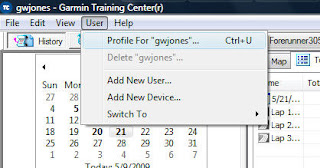
First thing is to open GTC. Go to the User menu, and select "Profile for...".
From this screen, you can set all of your training parameters - weight, birth date, heart rate zones and speed zones:
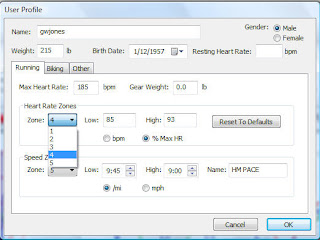
Use your heart rate training ranges for heart rate zones. You have 5 zones that you can set. For example, since I am a big Pfitzinger disciple, I have set my heart ranges like this:
Zone 5: 93 to 98% of MHR (VO2Max workout)
Zone 4: 85 to 93% of MHR (Lactate threshold workout)
Zone 3: 75 to 85% of MHR (General aerobic workout)
Zone 2: 65 to 75% of MHR (Recovery workout)
Zone 1: Don't care.
Finally, user your training paces to set up your speed zones. You can give each of your zones a different name. I've set mine up like:
Zone 10, 9: Not being used.
Zone 8: 5K pace (7:45 to 8:30 per mile)
Zone 7: 10K pace (9:00 to 8:31 per mile)
Zone 6: Reserved for later use
Zone 5: Half Marathon Pace (9:45 to 9:00 per mile)
Zone 4: Marathon Pace (10:30 to 9:45 per mile)
Zones 3, 2, 1: Not being used.
Once you have set up all of your training zones, we are ready for step 2 - setting up your workouts! We'll talk about this tomorrow.


